For authors
What actually works on Vox9
Updated 16 October 2026. Numbers measured from the platform, 30 days to 17 September 2026
Most advice about publishing is folklore repeated until it sounds true. Everything on this page is either a measurement taken from Vox9 itself, or a feature you already have and may not know about. Where the numbers contradict the usual advice, they are marked, because those are the useful ones.
- When people actually listen
- Where your audience is
- Subscribers first, then free
- Offer a yearly price
- Bring your Patreon supporters
- Cover art is not decoration
- Put chapters in a series, in order
- Your followers hear when you publish
- Turn an episode into a video
- Narration models
- Writing for the narrator
- Scene images
- Vox9 Studios, free for you
- Make a book from a series
- Promote your work on Vox9 Ads
- Credits, and why 100k is plenty
- What to publish
- Tell people where to find you
1. When people actually listen
Every hour of listening on Vox9 over the last 30 days, by hour of the day, UTC:
Hour of day, UTC. Gold is the peak.
The honest version: posting time matters far less than you have been told. The quietest hour of the day still carries 51% of the busiest hour's listening. That is a remarkably flat curve, and it means a large share of listening is background, commute and overnight rather than people sitting down at a particular moment.
If you want the small edge, publish so your episode is live before 20:00 UTC. If you publish at a different time because that is when you finish writing, you are giving up very little. Consistency is worth more than timing.
And be careful with day-of-week advice. Wednesday looks like the biggest day on Vox9 by a distance. Take the platform's single largest serial out of the figures and the difference between the best and worst day shrinks to about 20%. Most of that spike is one author's release schedule, not a day when the world wants to listen. Pick a day and keep it; your readers will learn it.
2. Where your audience is
Two things follow from that, and neither is "write American".
- Your evening is not their evening. A UK author publishing at 9pm local is publishing at 4pm US Eastern, which is close to ideal. An Australian author publishing after dinner is hitting the quietest part of the curve.
- Nearly half your audience is not American. British, Canadian and Australian listeners are almost a fifth of the platform between them. Spelling and idiom from your own country are not a problem here.
3. Subscribers first, then free
The model that works on Vox9: a new episode goes out to your subscribers first, then becomes free for everyone a few days later. Subscribers pay for getting there early, and the free release is what brings in new listeners who become the next subscribers. Nobody has to pay to hear your story, they only pay to hear it sooner.
For comparison, The Black Ship, the most-listened series on Vox9, releases weekly and each episode goes free on day 7, just as the next one arrives. That longer window suits a weekly schedule with a large following. If you are building an audience, shorter is friendlier.
When you publish or edit an episode in your dashboard, mark it for subscribers and set the Becomes free date. It opens up to everyone automatically on that date, with nothing more for you to do. If you leave the date empty, the episode stays subscriber-only until you change it.
4. Offer a yearly price
A supporter pays for the whole year in one go, at a discount, and you collect the entire year up front. They get a saving, you get twelve months of income today instead of twelve chances for someone to lapse in month three.
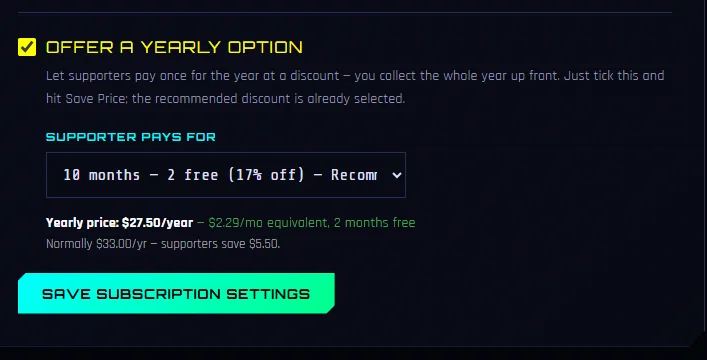
Your dashboard, Settings, under your subscription price. Tick it, pick a discount, save.
The recommended discount is already selected, so this is genuinely two clicks. Ten months for twelve is the default because it is the one people recognise: two months free reads as generous without costing you much, since a yearly supporter who would otherwise have lapsed at month four was never going to pay you for ten.
One thing to know before you switch it on. Yearly money arrives as one payment, which is excellent for you and means a refund is handled by hand rather than automatically. If someone asks for one, email us and we will sort it. It is rare, but it is better to know now than to find out during it.
5. Bring your Patreon supporters
If you already have paying supporters on Patreon, you can let them unlock your Vox9 subscriber episodes without paying twice. They connect their Patreon account once, and anything they are already entitled to over there opens up here.
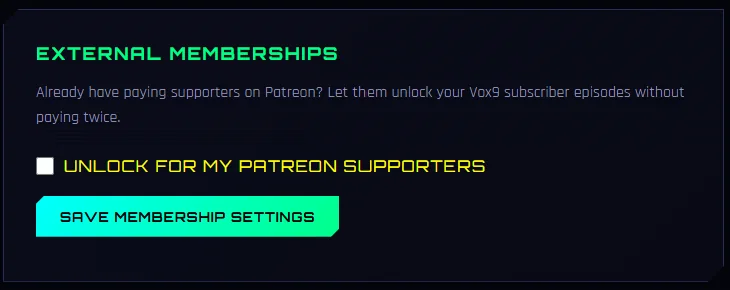
Your dashboard, Settings, External Memberships.
This is the one on this page that almost nobody has found: one author out of 109 has turned it on. The pitch to your own audience is a good one, because it costs them nothing and asks them to change nothing:
- Keep your Patreon. You are not moving anyone or asking them to cancel anything. Their pledge stays exactly where it is.
- They get the audio free. Someone paying you $3 a month on Patreon gets your early-access episodes here as audiobooks, at no extra cost.
- You reach people who will not sign up twice. A supporter who would never have started a second subscription is now listening, commenting and following.
Set a minimum pledge if you want, so only your paying tiers qualify. It is web only by design: a supporter connects once on the website and their episodes are unlocked everywhere, including in the app, because the entitlement lives on our side rather than theirs.
6. Cover art is not decoration
Be slightly sceptical of that number: only 30 published episodes have no cover at all, and an author who skips the cover may be skipping other things too. But the direction is not in doubt, and the reason is mechanical rather than aesthetic: a cover is what a browse row, a hub card and a shared link all display. An episode without one is rendered as a gap, and on some surfaces it is not rendered at all.
Give a series its own image too. Without one, the hub falls back to your first episode's cover, and a series with no image anywhere isn't shown at all. Your own series image is what you want listeners to see on the hub and in Popular Series, which is one of the better places on the site to be found.
7. Put chapters in a series, in order
If chapters of one book are uploaded as loose episodes, every reader who finishes one has to go and find the next themselves, and most will not. Inside a series they get the next chapter offered automatically, the series page holds the whole thing in order, and a single link sends a new reader to chapter one rather than to whatever you published most recently.
Worth knowing: a one-shot is fine as a standalone. The 2× gap is about continuation, not about series being magic. A short story with nothing after it loses nothing by standing alone, and it gets its own filter on the hub.
Check the order your listeners hear
A series plays from the first episode to the latest. Listeners see it in "Story order", and when one episode ends the next one in that order starts. If your episodes are sitting in the wrong order, for example newest at the top, a new listener starts at your latest chapter and hears the story backwards.
How to fix it
In your dashboard, go to Manage Playlists and open the series. Use the arrows beside each episode to move it up or down until chapter one is at the top and your latest chapter is at the bottom, then press Save Order. Listeners see it straight away. It is worth a 30-second check on every series you have, especially if you uploaded a back catalogue in one go.
8. Your followers hear when you publish
When you publish an episode, everyone who follows you gets an email, and listeners using the Vox9 app with notifications on get a push notification. Following is free, so every listener who follows you is someone you can reach again, without paying for an ad.
- Ask for the follow. A line at the end of an episode or in your series description ("follow me on Vox9 to hear when the next chapter is out") turns a one-off listener into a returning one.
- Keep a rhythm. A notification on the same day each week becomes something people expect. Irregular bursts are easier to ignore.
- Space out a backlog. Each episode you publish sends its own notification, so publishing ten chapters in an afternoon sends your followers ten emails. If you are uploading a back catalogue, release it over a few days.
9. Turn an episode into a video
New in September. Every episode with audio has a 🎥 button in your dashboard. It opens that episode in Vox9 Studios with the narration, captions and artwork already loaded, and you export an MP4 for YouTube, TikTok, Instagram or anywhere else.
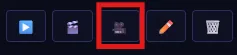
The third button along, on every episode that has audio.
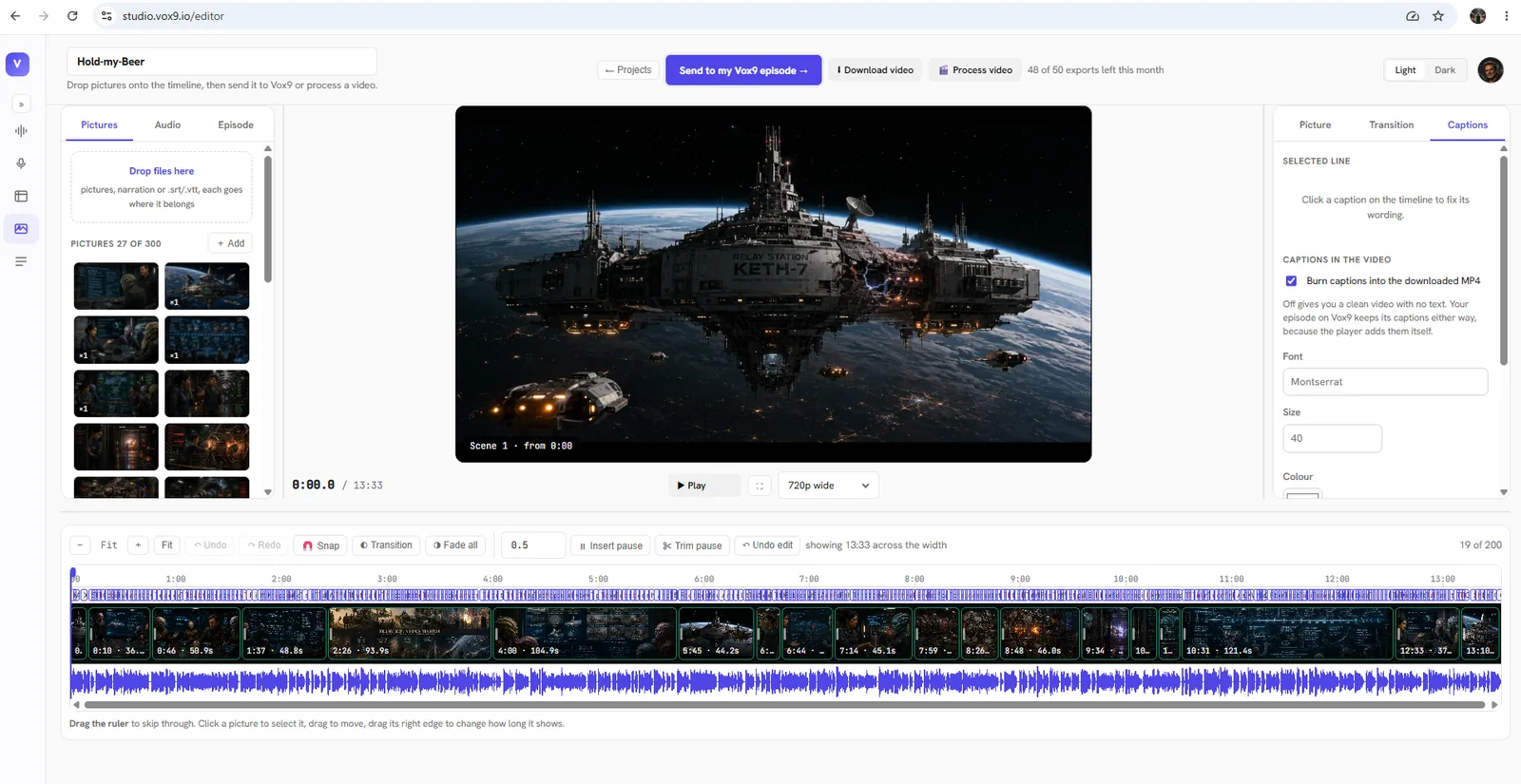
What the button opens. Pictures down the left, the timeline along the bottom, and Send to my Vox9 episode or Download video at the top. Note the export counter in the corner: 50 a month, because you are a Vox9 author.
- Nothing about your episode changes. The video is a file you download. Make as many versions as you like.
- 720p, with a small Vox9 Studios watermark. That is the same for everyone at the moment, including us.
- Up to 90 minutes long, 50 exports a month, because being a Vox9 author lifts you above the free limits automatically.
- You will be asked to sign in to Studios the first time in a browser. That is deliberate: passing your sign-in through the link would leave it sitting in your browser history and it would expire within the hour, quite possibly part-way through a render.
- It works on drafts, so you can cut a trailer before an episode goes live.
10. Narration models
Vox9 narration is made by ElevenLabs. On the create page you choose between two models:
Standard (Turbo v2.5)
The default, and what most of the platform's episodes were made with. Reliable, consistent across long chapters, and the voices you already know.
ElevenLabs V4 Turbo
The newest ElevenLabs voices, with more natural pacing and expression. It costs the same credits as Standard, so try a chapter in each and keep the one you prefer.
Why Turbo models? Every author gets 100,000 characters of narration a month for free, and that narration is not free for us to make. The Turbo models are the efficient versions of each ElevenLabs generation, and using them is what lets us keep giving every author a full free allowance every month rather than a token one. The quality difference for long-form fiction is small; the difference in how much we can give away is not.
11. Writing for the narrator
The narrator reads what you typed, not what you meant. These are the formatting habits that make ElevenLabs narration sound deliberate rather than flat.
Capitals for emphasis
"This is EXACTLY what I was looking for."
Double hyphens for a hard pause or an interruption
"I was just about to -- wait, did you hear that?"
Ellipsis for hesitation and trailing off
"Maybe we should... no, never mind."
One caveat worth knowing: an ellipsis ends a sentence as far as the narrator is concerned, so the words after it are read fresh rather than as a continuation. That is usually what you want for hesitation. It is not what you want mid-phrase.
Doubled punctuation for intensity
"Stop right now!!"
"Are you serious?!"
End a paragraph on ... or -- for a longer beat
She never looked back.
Then the screaming began.
Strip special characters, because they get read aloud
This is the one that catches everybody. The narrator will attempt to pronounce them.
Remove or rewrite: * / # ~ _ { } [ ] < > Scene breaks written as *** or --- are the most common offender, because they are invisible to you and spoken by the narrator.
A habit worth building
Read the first minute back before you publish. Almost every narration problem is audible in the first sixty seconds, and it is the sixty seconds that decides whether a new listener stays. If something is wrong, fix the text and generate again rather than living with it.
12. Scene images
Scene images appear over the player at timings you choose, so a long episode is not a static square for an hour. 211 episodes have them so far, which means it is still a way to stand out rather than the norm.
Two ways in:
- By hand: the Edit tab of any episode in your dashboard. Upload images and set the time each one appears. There is a Create empty tiles shortcut that lays out slots at a fixed interval, which beats typing timestamps one at a time.
- From a video you already made: Vox9 Sync at studio.vox9.io. Drag the video in and it pulls out the audio, the images and the scene timings, adds captions, and sends the result to your dashboard as a draft for you to publish.
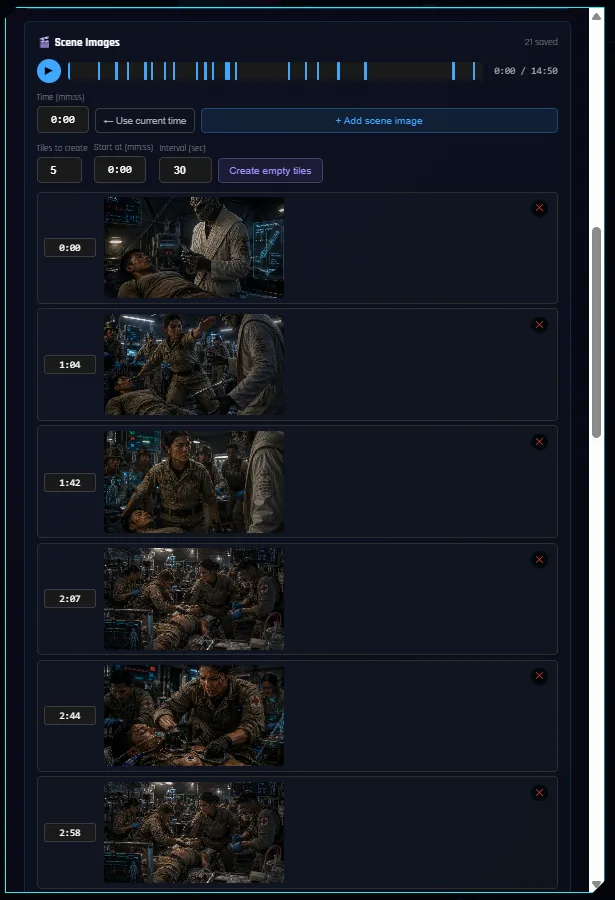
Scene Images in the Edit tab. Each image gets a timestamp, and the bar at the top shows where they land.
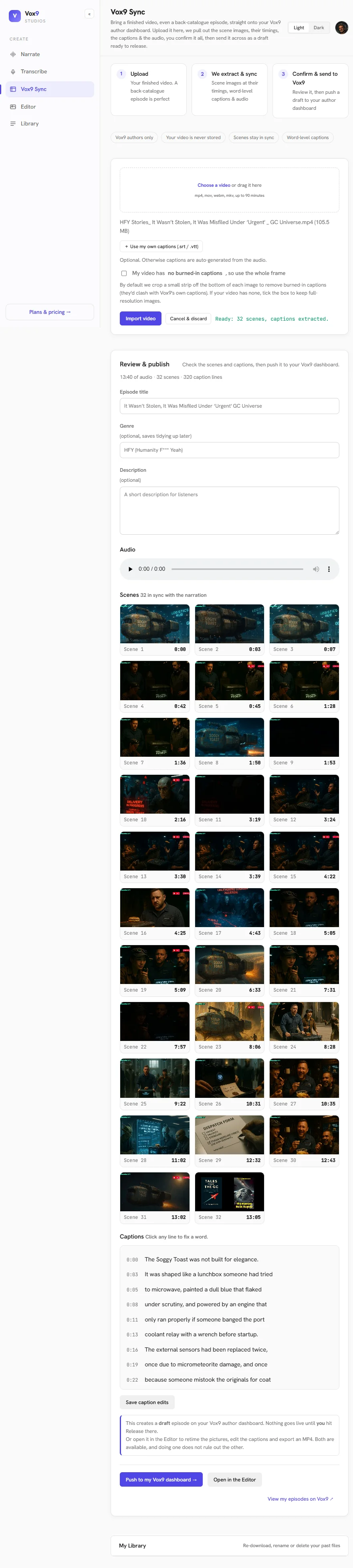 Click to see the whole page
Vox9 Sync, top to bottom. A 13 minute video went in; 32 scenes came out with their timings, 320 caption lines were written, and one button pushes the lot to your dashboard as a draft. Nothing goes live until you hit Release.
13. Vox9 Studios, free for you
studio.vox9.io is a separate toolkit, and being a published Vox9 author unlocks it without paying. Four tools:
Narrate
Text to speech with the same voice library you use here. Useful for anything that is not a Vox9 episode: a trailer, an author's note, a sample.
Transcribe
Audio or video in, accurate word-level captions out. Useful if you narrate yourself and want captions without typing them.
Vox9 Sync
A finished story video in, a Vox9 draft out: audio, scene images, timings and captions, straight into your dashboard. This is the fastest route if your work already exists on YouTube.
The Editor
Narration, pictures and captions on a timeline. Publish a draft to Vox9 or export an MP4. This is what the 🎥 button opens.
14. Make a book from a series
A series can be turned into a single long book, either the whole thing or a selection of episodes from it. Useful when a serial finishes and you want one object people can start at the beginning of, rather than forty chapter links.
15. Promote your work on Vox9 Ads
Every author with a published episode can advertise their own work to Vox9's listeners at advertise.vox9.io, at author rates that are deliberately lower than outside advertisers pay. Your author rates apply automatically when you sign up there as a Vox9 author. Two formats:
Display cards (image and link)
Your cover art and a link, shown among the cards in the browse hub on the website and in the app. Your first two weeks are free, for life, then $5 a week.
Audio pre-roll
A short audio spot about your work, played before someone else's episode. $10 per 1,000 plays, from a minimum of 50 plays. Listeners finish about 83% of them.
Top up from $10. Every campaign is reviewed before it goes live, and you can see plays, impressions and clicks for each one as it runs. Point it at your author page or a series, not a single episode, so a new listener lands somewhere they can keep going.
Read clicks, not impressions. A display card is seen far more often than it is acted on, so a hundred thousand impressions against a hundred or so clicks is normal, not a failure. Audio pre-roll is clicked more than ten times as often as a card, so if you only try one format, try that.
16. Credits, and why 100k is plenty
Credits are characters of narration, charged when you generate. 100,000 is roughly 17,000 words a month, which is four or five decent chapters. You can buy more if you are writing at pace, but on the evidence almost nobody needs to.
Deleting an episode does not refund its credits. They are spent at the moment of generation. This is the single most common surprise, and it is why proofreading before you generate is worth more than it looks: a regenerated chapter costs you the chapter twice.
17. What to publish
Your own stories. That is what Vox9 is for, and it is what builds a following: listeners follow an author, not a title.
- Public-domain works are allowed under our terms, because they are out of copyright. We do not encourage them, though. When several authors upload the same classic, listeners get five versions of one story and none of them stand out. In our experience they also draw far fewer views and listens than original work.
- Someone else's story, or a story set in their world, needs their permission. That includes fan fiction set in another Vox9 author's series.
- Re-uploading audio or video you did not make, for example from YouTube, is not allowed.
If you are not sure about something, ask us at support@vox9.io before you publish rather than after.
18. Tell people where to find you
This is the one that actually moves numbers, and the one most authors skip.
Your author page is the link to share. Not an episode, not the front page. It holds everything you have written, it works for someone who has never heard of Vox9, and since September it no longer asks a visitor to sign in before they can listen. If you have a Royal Road following, a subreddit, a Discord or twelve people who like your writing, that is the address to give them.
🔗 Copy it in one click
There is a Share your author page button beside the title on your dashboard's Library screen. Press it and the link is on your clipboard, ready to paste into a comment, a Discord, a video description or an email signature. It looks like vox9.io/author.html?u=yourname and it does not expire.
A single comment saying "I record these as audiobooks, they're here" does more than any feature on this page. The platform grows when your readers arrive, and your readers arrive when you tell them where to go.
Every figure here was measured from Vox9 over the 30 days to 17 September 2026, except the country split, which covers 718,714 classified plays over a longer period. Numbers move. If something here stops matching what you see in your own dashboard, your dashboard is right and this page is stale: tell us at support@vox9.io and we will fix it.